
Mobile staff planning for employers: a practical guide
Mobile staff planning means coordinating your team via an app instead of confusing Excel lists. This practical guide shows how employers react faster, reduce admin work and give teams more flexibility.
Mobile deployment planning means coordinating your team via an app instead of confusing Excel lists. This is not a technical frill, but a necessity in industries with highly fluctuating personnel requirements. You can do thatreact to changes quickly, without sinking into administrative chaos, and increase itSatisfaction in the team through more flexibility. In this way, you as an employer remain flexible and avoid expensive personnel shortages.
Why rigid deployment planning no longer works today
Does that sound familiar? A large order comes in, three employees call in sick at the same time, and the laboriously created roster collapses like a house of cards. What now follows is a flood of calls, uncoordinated chaos in WhatsApp groups and the vague hope that someone can step in at short notice. Unfortunately, this scenario is everyday life for many in the event industry, catering or security services.
Rigid annual or monthly plans in Excel are simply unsuitable for the dynamic reality of the modern job market. They are error-prone, a pain with every adjustment, no matter how small, and quickly lead to frustration – for you and your team.
The limits of Excel and telephone chains
Imagine an event agency planning staff for a large music festival. The plan is set, but shortly beforehand a main act cancels. Because of this, another area suddenly needs more security personnel.
The pure stress now begins with the Excel list:
- Who actually has the necessary qualifications as a security guard?
- Who is available and not already scheduled for another assignment?
- How do you reach all potential candidates quickly and reliably?
The manual search in tables and the subsequent phone calls eat up valuable time that you don't have in moments like this. Every call that goes nowhere increases the pressure.
In a fast-paced working world, speed of reaction is a necessity. Scheduling based on manual processes will always lag behind and, in the worst case, lead to unfilled shifts.
Skilled labor shortage and the desire for flexibility
The job market has turned. It's no longer just employers who choose. Today, qualified employees make very conscious decisions for or against a company. One of the decisive factors? Flexibility. Hardly anyone wants to be scheduled months in advance without the chance to swap a job or spontaneously accept an additional assignment.
This trend is exacerbated by the general economic situation. In Switzerland in particular, employment growth is stagnating, which is further fueling competition for good people. According to the Federal Statistical Office (BFS), companies only showed a minimal increase in the third quarter of 20232,800 jobs (+0.1%)compared to the previous year. After seasonal adjustment, the number of employees has actually fallen. The details of the currentDevelopments on the Swiss labor marketspeak a clear language.
If you as an employer do not create modern and flexible working conditions, your best people will leave for the competition. Mobile deployment planning is much more than just a practical tool - it is a clear signal to your team that you take their needs seriously.
By giving your employees the opportunity to maintain their availability via the app, swap shifts or proactively apply for open assignments, you create a win-win situation. Your administrative effort decreases, while satisfaction and personal responsibility in the team increase. In this way, you transform reactive planning stress into proactive personnel management and secure an advantage in the fight for the best talent.
Find the right tool for your needs
Choosing the right software is the decisive lever for successful mobile deployment planning. A brilliant sales pitch from the provider is of no use to you if the tool ultimately does not fit your daily challenges. That's why everything starts with a clear picture of your own requirements.
Before you get lost in demo versions and price lists, do a quick reality check. Grab a pen and paper or open a blank document and answer the crucial questions as honestly as possible. It's about identifying your real pain points, not an abstract wish list of features.
As an example, imagine a personnel service provider. He coordinates a mixed team of permanent part-time employees who work regularly and a pool of freelancers for specialized, short-term assignments. His list of requirements is the foundation of his decision – and protects him from expensive, bad purchases.
Your list of requirements beats every sales conversation
A good catalog of requirements is your compass. It saves you from being blinded by features you'll never need and ensures the absolute basics are covered.
1. The mobile app for employees
The heart of every modern solution is the app. It must be so intuitive that it can be understood without lengthy explanations. If your people have to read a manual to enter their availability, something is fundamentally wrong.
- Example from practice:The personnel service provider's freelancers are often on the move. For him, it is crucial that they can accept or reject a shift request with two clicks on their smartphone. A complicated web interface would dramatically slow down response time and end up leading to unfilled shifts.
2. Flexible availability queries
You need to know when your team can and wants to work. A good system allows employees to maintain their availability independently and proactively. This saves you countless phone calls, emails and Excel list chaos.
- Example from practice:The service provider needs a function that allows him to make targeted requests, such as: "Who is available next Saturday between 6 p.m. and midnight?" The system should then only show him those people who have signaled their willingness during this period.
3. Smart qualification filter
Not everyone can do every job. A crucial characteristic of a good oneMobile deployment planning for employersis the possibility of storing qualifications. You want to make sure that only trained security guards are asked for a security job - and not the bartender from the next pool.
- Example from practice:For a trade fair, the service provider needs staff with fluent English skills and a “Hostess” certification. His system must be able to filter these two criteria in order to rule out wrong appointments from the outset.
Don’t forget the technical and legal must-haves
In addition to the operational functions, there are hard criteria that are non-negotiable. If you ignore them, things can get expensive and complicated later.
A tool that isn't GDPR compliant or doesn't fit into your existing systems creates more problems than it solves. Focus on solutions that take work away from you, not create new work.
GDPR compliance in the Swiss context
Your employees’ data is sensitive. Pay close attention to whether the provider complies with the General Data Protection Regulation (GDPR) and the specific requirements of the Swiss Data Protection Act (DSG). A server location in Switzerland or at least in the EU is a strong indication of this.
Interfaces to payroll accounting (payroll)
At the end of the month, every minute counts. A solution that integrates seamlessly with your payroll software is worth its weight in gold. Manually transferring hours from one app to another system is not only tedious, but also a huge source of errors.
- Example from practice:The personnel service provider uses common payroll software. He specifically checks whether the planning software provider offers a ready-made interface or at least an export function in the right format. This alone saves him several hours of manual data transfer per month and reduces the risk of errors to zero.
To make the evaluation easier for you, we have summarized the most important functions in a table.
Functions of mobile planning tools in comparison
This table will help you evaluate the core features of different solutions and set your priorities.
| function | Must-have criterion | Should criterion (nice-to-have) | Practical example (Why it is important) |
|---|---|---|---|
| Mobile employee app | ✔️ | Employees can report their availability, accept shifts and record working hours from anywhere. Today, nothing works without an app. | |
| Availability query | ✔️ | You can see at a glance who can work when. This reduces the planning effort from hours to minutes. | |
| Qualification filter | ✔️ | Ensures that only qualified personnel are scheduled for a shift (e.g. "Show first responders only"). | |
| Automated shift suggestions | ✔️ | The system suggests suitable employees based on availability and qualifications. Speeds up planning enormously. | |
| Interface to payroll accounting | ✔️ | Approved hours are sent directly to payroll. No manual typing, no errors. | |
| GDPR/DSG compliance | ✔️ | Legal duty. Protects you and your employees’ data. A server location in the EU/CH is important. | |
| Digital time recording | ✔️ | Employees clock their times directly in the app. This creates transparency and a correct billing basis. | |
| Shift swap function | ✔️ | Allows employees to swap shifts with each other, which increases personal responsibility and relieves you as a planner. |
With this checklist you are well equipped to separate the wheat from the chaff.
After you have defined your individual requirements, you can start comparing different providers. You can find a good overview of proven solutions in our large comparison of different onesOperations planning software provider. This will ensure you make an informed decision that will truly move your business forward.
Make the introduction to the team smooth
A new tool, even if it brings obvious benefits, can initially cause uncertainty among your team. The key to a successful launch is a clear, well-communicated roadmap. You take your team with you from the start instead of presenting them with a fait accompli.
Imagine you run a hotel and want to digitize the entire operational planning for reception, housekeeping and restaurant. The current process with notices on bulletin boards and countless phone calls is simply no longer sustainable. A smooth transition not only ensures acceptance, but also ensures that you feel the benefits of the software from day one.
Lay out the basics in the system properly
Before even an employee opens the app for the first time, you need to prepare the digital environment. A clean configuration is the be-all and end-all for any working systemMobile deployment planning for employers. Here you lay the foundation so that everything runs automatically later.
Start with the simplest building blocks:
- Define locations:Create all relevant work locations. For our hotel, for example, these would be “reception”, “restaurant service”, “kitchen” and “housekeeping floors 1-3”. This way you can assign layers precisely.
- Create employee profiles:Record all relevant data from your employees. In addition to the master data, the contractually agreed working hours and contact details are particularly important.
- Deposit qualifications:This is one of the strongest levers. Define skills such as “First Aider”, “Language: English C1”, “Barista Certificate” or “Reception Manager”. You then assign these to the appropriate people in the team.
When you later create a shift for the hotel bar, simply filter for employees with a “barista certificate”. This prevents incorrect appointments in one fell swoop and saves you having to search manually in Excel lists.
Shift templates as a time saver in everyday life
You should definitely save recurring shifts as templates. Your hotel probably has an early and a late shift at reception every day. Instead of creating them every day, you create them once as a template.
Example of a shift template “Reception early shift”:
- Title:Reception early
- Time:6:00 a.m. – 2:30 p.m
- Required personnel:2 people
- Required qualifications:“Reception Manager” (1x), “Receptionist” (1x)
- Location:reception
With templates like these, you can create a roster for a whole week with just a few clicks. All you have to do is drag the templates into the calendar and the system immediately knows what the shift requirements are.
Communicate the introduction transparently
Nobody likes surprising changes. So announce the change early and explain clearlyWhythis step is necessary. Focus on the benefits for the team, not just the company.
The best software fails if the team doesn't adopt it. The focus should always be on “What’s in it for me?” from an employee perspective: more flexibility, fairer planning and fewer calls on the day off.
A simple communication plan for our hotel example:
- Announcement in the team meeting:Inform everyone personally about the upcoming change. Explain the reasons (less stress, faster planning) and the rough schedule.
- Training of team leaders:First, turn the managers – for example the head of housekeeping – into experts. They will be the first point of contact for their teams.
- Short, understandable instructions:Nobody reads long manuals. Rather, create short video tutorials (maximum 2 minutes) for the most important functions of the app: "How do I enter my availability?", "How do I apply for an open shift?", "How does the shift swap work?".
This simple process helps you to clearly structure your approach: define requirements, filter tools and then test them thoroughly.
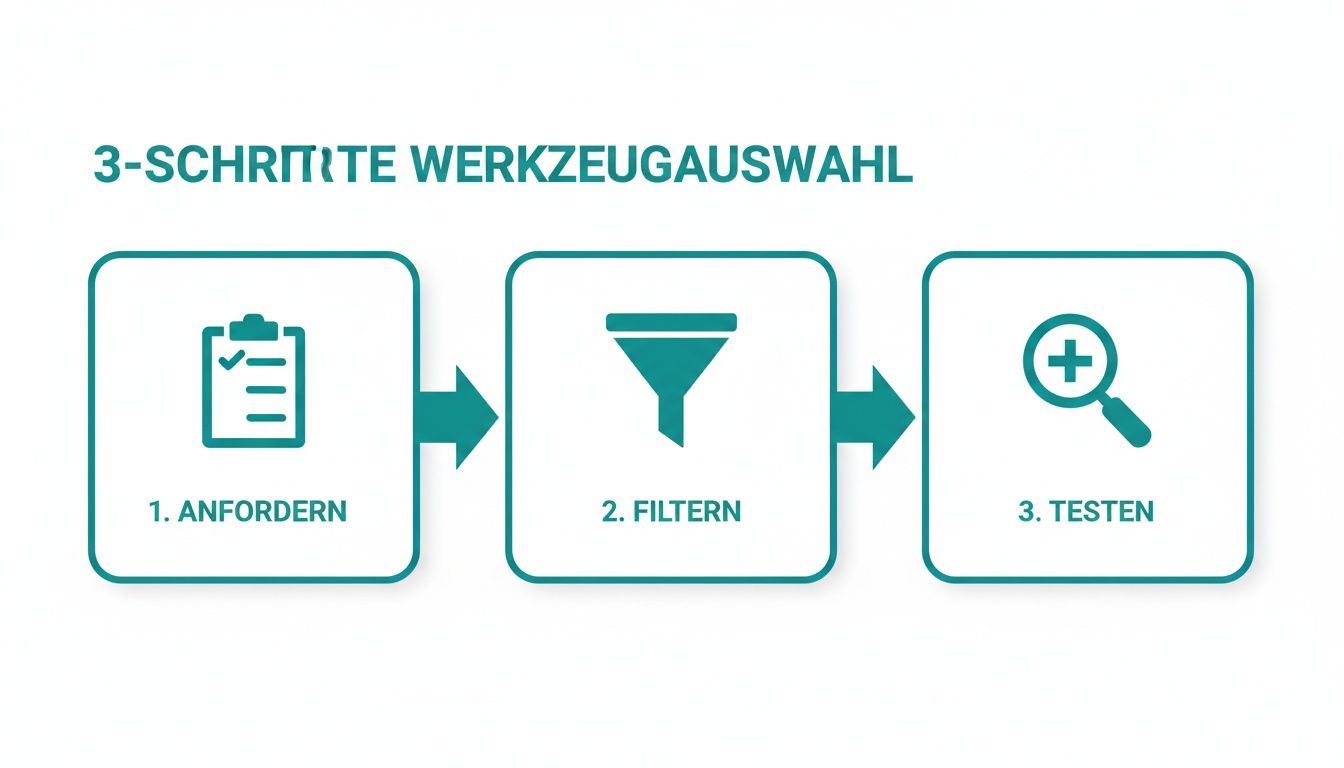
The visualization makes it clear: After defining the requirements (request) and comparing the options (filtering), a crucial test phase follows before the final decision is made.
The pilot phase as a litmus test
Before you activate the system for the entire hotel, start a pilot phase with a small, motivated test group. The reception team is usually ideal for this.
Checklist for a successful pilot phase:
- Duration:Two to four weeks are ideal for collecting meaningful feedback.
- Clear goal:Test all core processes – from shift creation to application to final time recording.
- Regular feedback:Conduct short weekly feedback sessions. What's going well? Where is the problem? What is unclear?
- Documentation:Record all feedback to take into account later when fine-tuning the system.
This honest feedback from practice is worth its weight in gold. You recognize small hurdles before they become major problems for the entire company. Just that oneSkilled labor shortage in Switzerland, especially in the hotel industry, makes it more important than ever to respond to the needs of employees.
Mobile deployment planning, if implemented well, can be a decisive factor for employee retention. After a successful pilot phase and the necessary adjustments, nothing stands in the way of the rollout for the entire company.
Mastering the daily processes in practice
Your new deployment planning software is ready to go. Now the most important part begins: daily use. It is now important to internalize the new digital processes in such a way that they really save you and your team time and noticeably reduce administrative effort.
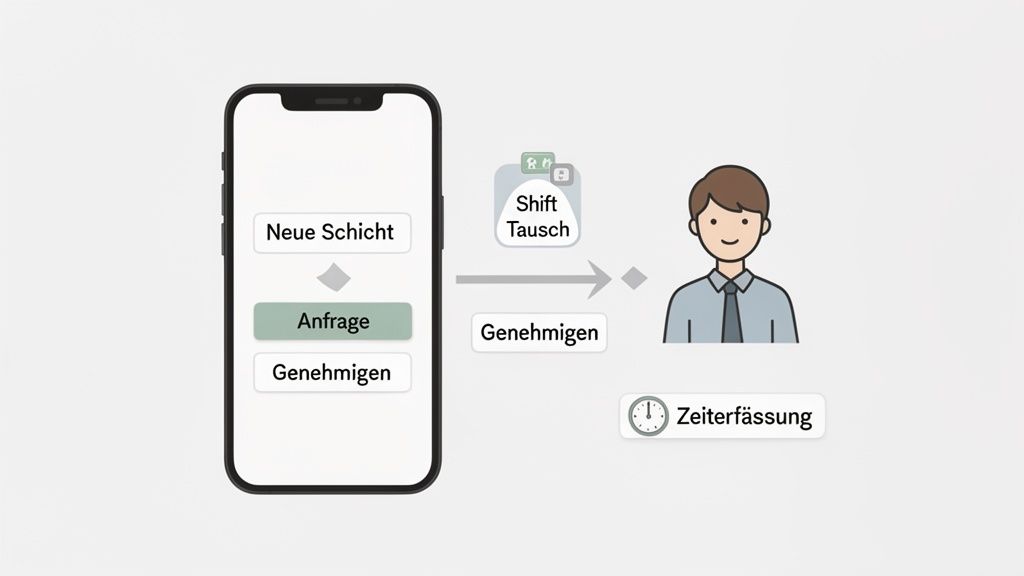
Let’s take a look at the entire life cycle of a shift, from the first click to the final hour confirmation. As a practical example, we are accompanied by a security service that coordinates personnel for various properties such as shopping centers, construction sites and events. His goal is to fill short-term requests quickly and without countless phone calls.
From demand to occupied shift in minutes
Suddenly a customer calls: An additional night guard is needed at short notice for a construction site tomorrow morning due to an incident of vandalism. In the past, the dispatcher would have looked through his lists and started calling employees. Things are different today.
The process is amazingly simple and quick:
- Create layer:The dispatcher opens the planning interface and creates a new shift for the required period using a “Night Watch Construction Site” template.
- Filter qualifications:He adds the required qualification "Security Specialist with Certificate X". The system immediately shows him how many people from his pool meet this requirement.
- Check availability:The system automatically compares the request with the stored availability. Employees who are already scheduled or marked as “unavailable” on that day will not even be taken into account.
- Send targeted request:With one click it sends a push notification to everyone12 qualified and availableemployees. The request contains all important information: location, time, task and hourly wage.
The first employee to accept the request in their app will be awarded the contract. The shift will be filled automatically and everyone else will receive a notification that the position has been taken. What would have previously taken an hour can now be done in under five minutes.
The greatest benefit lies in targeted communication. Instead of bothering everyone with irrelevant requests, you only reach the people who can and want to do the job. This increases acceptance and reduces communication noise.
Employee self-service as a relief for you
A central building block of a modernMobile deployment planning for employersis the responsibility of the team. If your employees can take care of simple things themselves, your head will be free for more important tasks.
Shift swapping made easy
An employee of the security company realizes that he cannot work a shift at the shopping center that he had already agreed to due to a private appointment. Instead of calling you, he starts the exchange process directly in his app.
- He offers his shift to the system in exchange.
- The software automatically sends a request to all colleagues who have the same qualifications and do not yet have a shift that day.
- A colleague accepts the exchange offer.
- As a manager, you will only receive a notification for final approval, which you confirm with one click.
The entire process takes place without your direct intervention. The roster is always up to date and responsibility is shifted to where it belongs – in the team.
Mobile time tracking that really works
Filling out timesheets manually is one of the biggest sources of errors in payroll accounting. Mobile time recording via app creates transparency and accuracy from the very first moment.
When the security worker starts his shift at the construction site, he simply opens his app and clocks in. Many systems offer one hereGPS validationto. This means that the system checks whether the employee is actually at the predefined location (geofencing). This prevents incorrect bookings and gives you the security that working hours are recorded correctly.
At the end of the shift he clocks out again. He can also record breaks directly in the app. The hours worked are immediately visible in the system and are waiting for your confirmation. You check the recorded times, release them, and they are ready for payroll. This not only saves paper, but also countless queries at the end of the month.
Such automated processes are becoming increasingly important. A Manpower forecast shows that many employers are hiring fewer staff due to economic concerns.52 %plan to rely more on automation over the next 12 months to become more resilient. Find out more about theTrends in personnel planning in Switzerland. Platforms that automate availability queries, invitations and mobile time recording are a clear advantage here.
Discover how to get with the right oneTool for quick deployment planningsimplify your daily processes. The combination of targeted inquiries, employee self-service and precise time recording not only makes your planning faster, but also significantly more robust against unforeseen events.
From hourly recording to the finished payroll
The circle of digital deployment planning closes where the greatest administrative pain often lurks: when preparing the monthly payroll. Manually transferring timesheets is not only painfully slow, but also a huge source of errors. A number transposition here, a forgotten pause there – and the arduous correction begins.
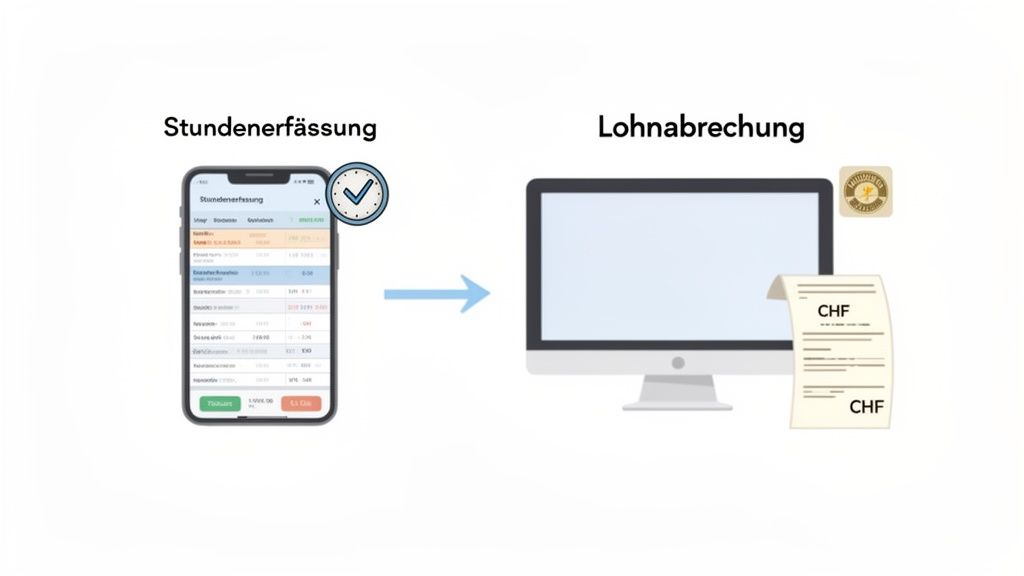
This is exactly where well thought-out software shows its true strength. The goal is crystal clear: validated working hours, breaks and bonuses must be transmitted automatically and error-free to payroll accounting.
The automatic data flow to payroll
Imagine a cleaning company that employs dozens of part-time workers at rotating locations. The managing director used to painstakingly collect all the handwritten notes at the end of the month. Today the process is completely different.
After an employee has finished their shift and clocked out via the app, the recorded time is available for review in the system. The manager validates the hours with one click. From this moment on, the data is “sharp” and ready for the next step.
Good software offers a direct interface to common payroll accounting programs. The validated data flows automatically into your payroll software.
- Working hours:The exact hours are transmitted per employee.
- Surcharges:Night or weekend supplements are automatically calculated and allocated correctly.
- Breaks:Statutory break times are taken into account and deducted.
For the cleaning company this means: The entire job preparation process, which previously took several days, is now completed in just a few hours.
The key lies in the validation chain. Because every hour of work is recorded digitally and confirmed by a superior, a clean and comprehensible database is created. Manual transmission errors are now a thing of the past.
Complete traceability thanks to change logs
What happens if a time booking needs to be corrected later? An employee forgot to clock out or a break was recorded incorrectly. Such adjustments are normal, but they must be completely transparent.
Any good software for thatMobile deployment planning for employerskeeps a complete change log. It states,who when what changehas undertaken. These protocols are worth their weight in gold when it comes to checks or questions from employees. They create trust and ensure legal protection.
Clean reports with just a few clicks
At the end of the month you need clear evaluations. With a connected system, you can create clean wage reports at the push of a button. You can filter the data by employees, locations or time periods and export it as a PDF or CSV file. You import this file directly into your payroll program or simply pass it on to your escrow office.
If you are just starting out and are handling processes manually, templates are a good idea. Check out oursTemplate for recording working hoursto get a feel for the basics.
Remember that with mobile employees there are also issues like thisDeduct travel expenses from taxesbecome relevant. The digital recording of work routes can be of great help here. By seamlessly connecting time recording and payroll accounting, you transform one of the most complex administrative processes into a quick and error-free process.
Frequently asked questions about mobile deployment planning
Here we clear up the typical concerns and practical hurdles that arise again and again when switching to mobile deployment planning. This means you can get started smoothly.
How do I deal with employees without smartphones?
An absolutely legitimate question, but in practice it is usually less dramatic than feared. The first step should always be to check how many people in your team actually don't have a smartphone. Often this number is surprisingly small.
However, there are very pragmatic solutions for the few cases:
- The team leader approach:A shift or team leader can maintain availability for colleagues without a smartphone and simply communicate the shift details to them personally. Time recording then also runs via the supervisor’s device or a central terminal.
- Web access as an alternative:Almost every good system offers access via a normal web browser in addition to the app. This allows employees to log in from any computer, enter their availability and check the roster.
- Provision of company devices:If there are more employees without their own device, purchasing a few simple, inexpensive company smartphones can quickly pay off.
There is almost always an uncomplicated solution that ensures everything runs smoothly for everyone.
Is my employees’ data safe?
Data protection is not a “nice-to-have”, but an absolute necessity – especially when it comes to sensitive employee data. When choosing your tool for theMobile deployment planning for employersThis issue must be at the top of the priority list.
Be sure to pay attention to these sticking points:
- Server location:Choose a provider whose servers are in Switzerland or at least within the EU. This is the only way you can be sure that the strict European and Swiss data protection laws (GDPR/DSG) actually apply.
- Order processing contract (AVV):A reputable provider will present you with an AVV without being asked. This document regulates in a legally binding manner how the provider handles your data. Without AVV – stay away!
- Roles and rights system:You must be able to clearly define in the system who sees what data. A normal employee should never have access to their colleagues' contact details or salary details.
Trust is good, a solid legal framework is better. Take the time to carefully review a provider's privacy practices. It protects you, your company and, above all, your team.
What happens if there is an internet outage?
An important objection, especially when used in places with shaky network coverage, such as at large festivals, in rural areas or deep in the basement of a building. Good mobile apps are prepared for exactly such scenarios.
Many modern applications have a so-calledOffline mode. This means that the employee can clock in and out as normal even without an active internet connection. The app simply saves the timestamps locally on the device.
As soon as the smartphone has a connection to the Internet again, the recorded data is automatically synchronized with the central system. This means no working hours are lost and planning security is fully maintained, even under difficult conditions.
Are you ready to radically simplify your deployment planning and give your team the flexibility they deserve?job.rocksoffers you a comprehensive solution that is tailored precisely to the needs of dynamic companies - from smart planning to error-free payroll.