
Roster app: Find the best one for your Swiss team in 2026
The best roster app for Swiss teams: ArG-compliant, with time recording, mobile access and wage connection. Comparison, checklist and practical tips for 2026.
You're probably sitting in front of a mix of Excel, WhatsApp, emails and short-term phone calls. Someone wants to swap shifts, someone says they want a vacation, someone is sick, and yesterday's plan is already wrong today. The problem is not your effort. The problem is the tool. Who typical errors in the Roster creation knows, recognizes more quickly where the process breaks down.
If you are planning in Switzerland, just any generic roster app will not suffice. You need a system that not only distributes shifts, but also with them ArG, data protection and a frequently changing employee pool. Especially in events, gastronomy, security, cleaning or health care, poor planning costs twice as much. First in the office, then at the corrections.
Roster app – briefly explained
One Roster app is software that allows you to plan working times, shifts and availability centrally digitally - instead of using Excel, WhatsApp and paper. For Swiss companies, it must also reflect the Labor Act (ArG), rest times and data protection. The right app reduces planning errors, speeds up short-term reassignments and connects planning directly with time recording and wage preparation.
No more planning chaos
On Monday morning, the restaurant manager sends you three changes via WhatsApp. Shortly afterwards, a service employee logs off via email. A temporary chef calls and says he can take over two evenings this week. Half the week is now wrong in your Excel file.
This is how it works in many Swiss companies. Especially where part-time, freelancers or seasonal teams work. You write down availabilities by hand, move cells, color fields and hope that you haven't overlooked anything. Then you send the plan. Two hours later the correction begins.
This doesn't just cost time. It also leads to the typical subsequent errors:
- Double divisions happen because there are multiple versions of the plan in circulation.
- Missing feedback block the occupation of shifts.
- Unclear responsibilities ensure that the same people step in again in the end.
- Short-term outages turn planning into a hectic search for a replacement.
This is particularly brutal at an event agency. You are planning a trade fair with hostesses, set-up and dismantling crew and security. Each assignment has different times, different qualifications and often a different meeting point. If you control this manually, you will no longer manage bets. You're just chasing corrections.
Anyone who still plans with Excel and chat groups creates new sources of error every day.
That's why you need a central solution for availability, scheduling, communication and feedback. If you want to check what something like this looks like in action, take a look Personnel scheduling software for flexible teams to. Not as a luxury. As a clean answer to a clean problem.
What a good roster app can really do
On Wednesday at 4 p.m. a service worker will be unavailable for Friday evening. Now you can see whether your roster app is working or whether you are coordinating WhatsApp, Excel and individual calls again. A good solution shortens this process to just a few minutes and prevents errors before they end up in the shift.
Record availabilities centrally and bindingly
The first test is easy. Employees enter their availability themselves, directly in the app, with clear time windows and restrictions. You then plan with a current status instead of chat histories, screenshots and outdated attachments.
This is particularly important in everyday Swiss life because many companies work with part-time, on-call work, students and seasonal teams. If availability is only collected loosely, gaps, misunderstandings and unnecessary questions arise.
In the catering industry you can see the benefits straight away. For Friday evening, you need two people in service and one at the bar. A good app shows you at a glance who is available, who has mastered the task and who already has enough assignments.
Correctly depict qualifications and rules of engagement
Availability alone is not enough. You have to put the right person on the right shift.
That's why the app needs filters for qualifications, functions and operating conditions:
- Separate bar and service clearly. Not every temporary worker is allowed to collect cash or prepare cocktails.
- Staff security correctly. Individual orders require certain evidence, experience or a defined role.
- Divide event crews appropriately. Entrance, stage, promotion and box office have different requirements.
Generic apps from the German market are often too rough here. They manage shifts, but no company-specific rules of engagement for Swiss teams. This is exactly what leads to incorrect appointments, unnecessary rebookings and, in the worst case, violations that you only notice after the assignment.
Reduce routine work instead of just digitizing it
Many companies simply digitize the old effort. That doesn't help much. A good roster app automatically collects availabilities, takes over recurring shifts, informs the right people of changes and creates evaluations without manual work.
This is how you regain leadership time. Not because of a beautiful interface, but because there are fewer queries, fewer corrections and less duplicate work.
It also makes sense to combine planning and time recording. If you plan shifts but track actual times separately, you create new breaks in the process. That's why it's worth taking a look at one Time recording app for Swiss companies with shift reference.
Communication that reaches the right person
Planning errors often arise after scheduling. A shift is postponed, but the information reaches the affected person too late or in the wrong channel. Then someone is not where they are needed.
A good app sends changes specifically to the affected employees, documents feedback and keeps the current plan available for everyone in the same place. This reduces the coordination effort in the office and on the field.
Practice rule: If plan changes need to be tracked across multiple channels, your process is set up incorrectly.
Evaluations that help you plan better
You don't need any statistics games. You need answers that help you manage staff and identify bottlenecks.
| Ask | What the app should show |
|---|---|
| Who regularly works more than planned? | Hours per employee |
| Which department is often understaffed? | Shifts per department |
| Where do gaps repeatedly arise? | open or unoccupied missions |
| Who often steps in at short notice | Usage history and availability |
These evaluations not only help you operationally. They also show where your model tips. Too few qualified people, too many spontaneous changes, too much dependence on individual people. This is exactly where it decides whether your planning is stable or only lasts until the next failure.
Legal certainty in Switzerland ArG and GDPR under control
Friday, 10:30 p.m. An event runs longer, two employees stay for dismantling and return transport. The next morning, the same people are back on the schedule early. This is exactly how ArG violations occur in Swiss companies. Not out of any bad will, but because the app only distributes shifts and does not properly check the Swiss rules. The SECO provides specific guidelines for shift schedules and working time permits, which your app ideally takes into account automatically.
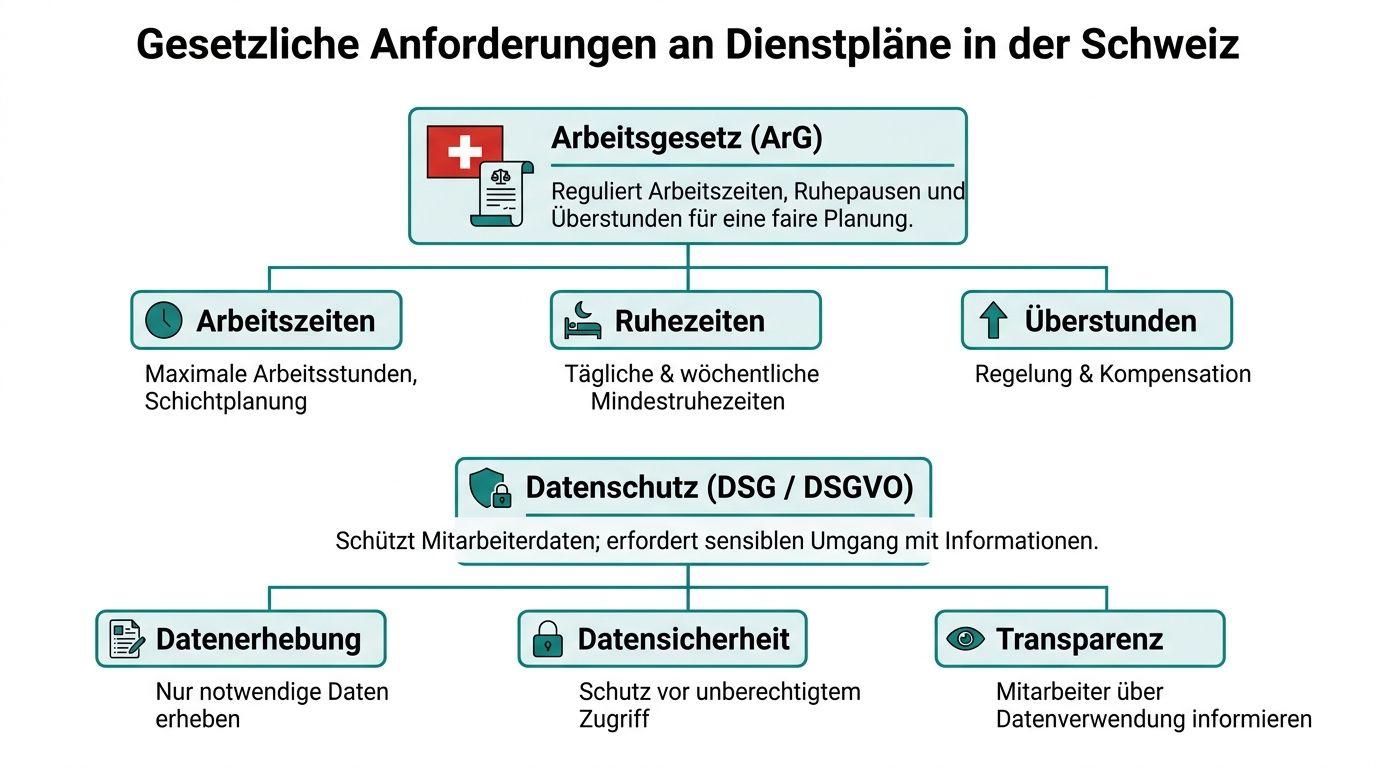
Excel does not check law
Excel shows you who is working and when. However, it does not reliably check whether rest periods are being observed, whether someone is already at the limit of the permitted working hours or whether planning on Sundays is even permissible.
You often only recognize the problem after use. Then you don't have clear proof, the change was confirmed via chat somewhere and at the end you have to explain why the plan was released anyway.
Good roster apps check labor law rules directly during planning, mark conflicts immediately and log changes in a comprehensible manner, like the overview of Roster software with working time law check describes.
That's what matters.
What you really need to pay attention to in Switzerland
Many providers properly cover standard German cases. In Switzerland that is not enough. You have to check whether the app reflects Swiss requirements in everyday life, not just in sales conversations.
Pay particular attention to these points:
- Rest periods between missions, especially during shared shifts, evening events and early follow-up shifts
- Maximum working hours and weekly workload during seasonal peaks or staff shortages
- Night, Sunday and on-call operations, if your company uses such models
- Overtime, bonuses and exceptions by industry and type of application
- Traceable releases and changes, so that you don't have to rely on screenshots in the event of a dispute
Events, gastronomy and security in particular regularly fall into the same trap. The app can plan, but cannot think legally. Then a practical tool becomes a liability risk.
Swiss peculiarities are not a minor matter
Many entrepreneurs realize too late that their software only roughly reflects Swiss rules. This only becomes noticeable when an operation lasts too long, a rest period is not exceeded or documents are missing during an inspection.
My advice is clear. Don’t ask whether a provider “also works in Switzerland”. Question of how the system specifically depicts ArG rules, exceptions, surcharges, approvals and documentation for Swiss companies. If there is no precise answer, the solution does not fit.
Don't use a roster app that only roughly complies with Swiss law. Take one that reflects it in the system in a verifiable way.
Data protection is a management task
A roster app processes personnel data. Names, contact details, working hours, absences and, depending on the assignment, location data. You have to put it on cleanly.
I demand these points from every provider:
| Point | What exactly should you ask for? |
|---|---|
| Server location | Switzerland or EU |
| Contract | completed AVV |
| Access rights | only relevant people see relevant data |
| Logging | Changes to the plan, time and absences remain traceable |
| Mobile use | Securely and cleanly documented even on the go |
If a provider avoids these questions, remove them from the list.
Time recording is part of it
Legal certainty does not end with the target plan. The difference between what was planned and what was actually worked is crucial. This is exactly where the tricky cases arise when it comes to rest periods, overtime and bonuses.
That's why you should look at planning and actual times together. A good place to start is to look at one Time recording app for Swiss companies with shift referenceif you want to combine rostering, working hours and evidence in a clean process.
Flexibility and motivation through mobile employee app
Monday, 5:45 a.m. A service worker calls in sick, a security employee is stuck in a traffic jam, and two part-time employees ask via WhatsApp whether the assignment is still valid today. If your business relies on PDFs, telephone chains and Excel, you're wasting time exactly when you don't have them.

A mobile employee app only solves this problem if it is actually used in everyday life. This means: Employees see their current deployment on their cell phones, report availability themselves, request exchanges cleanly and record their times without paperwork. This brings calm to hectic operations, especially in the catering, hotel, event and security industries.
Take a typical case from hotel operations. A service employee works part-time, studies at the same time and is happy to take on additional assignments at events. If she maintains her availability in the app herself, sees free shifts and can initiate an exchange, planning becomes easier for both sides. The line calls less afterwards. The employee can organize her everyday life better.
What employees really need
Employees don’t want a collection of functions. You want clarity.
- Current plan on the smartphone instead of outdated printouts
- Shift exchange with approval process instead of message chaos in the team chat
- Maintain availability yourself instead of constant questions from the office
- Mobile clocking in and out instead of handwritten corrections at the end of the month
This doesn't just improve your mood. It also reduces the coordination effort in operations management. Open shifts can be filled more quickly because the right people can immediately see what is available and whether the assignment fits their availability.
Important in Switzerland: This flexibility must not come at the expense of the rules. An app cannot simply technically allow swaps and additional shifts without taking into account rest times, daily limits or internal approvals. This is exactly where many solutions that were primarily built for the German market fail. They make shifts visible on mobile devices, but do not examine the labor law consequences sufficiently enough. This means an unnecessary risk for you.
Mobile time recording prevents discussions
Conflicts over working hours rarely arise intentionally. They arise because the beginning, end, break or location are no longer clearly documented afterwards.
If employees clock in and out on site using mobile devices, the process is documented more clearly. This is particularly helpful for field operations, changing locations and short-term changes. A security service with multiple properties or a promotional team on tour needs exactly this simplicity. Otherwise, at the end of the month you will discuss each deviation individually.
This also includes a quick look at its practical use:
Good apps relieve both sides
A usable employee app gives your team the opportunity to neatly edit availability, deployments and times themselves. This isn't a gimmick. It saves queries, reduces errors and speeds up the response to failures.
Therefore, check the app consistently from the perspective of the employees. Can the shift swap be completed in just a few steps? Are changes visible immediately? Does a temporary employee understand the operation without training? If not, the app is bypassed in everyday life.
My clear recommendation: Only choose a solution that combines mobile use with clear approvals. Employees should be able to react flexibly. The management should still retain control over rules, responsibilities and clean evidence. This is exactly where acceptance arises.
Integrations and the measurable value of your planning
At the end of the month you will quickly see whether your roster app is a tool or just a nicer interface for old chaos. If operating times are first planned, then exported, then corrected and then transferred again to another system, you pay twice. With time and with mistakes.
Without direct interfaces, the effort remains
A good app doesn't end with the roster. It transfers data error-free to the systems you already use for payroll, HR and internal coordination. Otherwise you'll just move the work from paper to post-processing.
Three integrations bring the greatest benefit in everyday life:
| Area | Why does this matter in everyday life? |
|---|---|
| Payroll accounting | Confirmed working times are included in the billing without being recorded again |
| HR master data | Entries, departures, workloads and roles remain the same in all systems |
| communication | Changes reach the right people immediately instead of in old chat histories |
In Switzerland in particular, this point is more delicate than many providers admit. An app for the German market can plan shifts, but often fails when it comes to the rules behind it. If bonuses, rest periods, night work or assignments subject to exceptions have to be checked internally separately according to ArG, you lose control of most of the benefit again. Then you have integration on paper, but no reliable process.
A multi-property security service demonstrates this well. The teams clock mobile at different locations, the operations management shifts personnel at short notice, and the wage preparation ultimately requires resilient times. If this data goes into billing without retyping and at the same time remains comprehensible for labor law checks, this saves office work and reduces the risk of incorrect bookings.
Hidden costs of manual planning
Many companies underestimate what Excel-based planning really costs. Not on the invoice, but in the total of the subsequent expenses:
| Cost factor | What happens in the company |
|---|---|
| Manual rework | Every shift change is recorded twice: in the plan and in the time recording |
| Version chaos | Multiple file versions lead to incorrect planning and corrections at the end of the month |
| Legal risk | Without an automatic ArG check, rest time violations remain undetected for a long time |
| Jumper load | The same people always step in because bottlenecks are identified too late |
| Wage error | Surcharges and overtime must be recalculated manually |
Value is created in the process, not in the feature list
The benefits of a roster app are easy to check. Don't look at the number of features first. Look at the friction in your routine.
A usable solution primarily improves these four points:
- fewer manual corrections between planning, time recording and wages
- clearer evidence for deviations, short-term changes and surcharges
- clean evaluations by location, function, object or department
- previous notices on underfunding, overtime or problematic consequences of deployment
Anyone who wants to reduce personnel costs with digital planning will find it concrete approaches here. This is the measurable part. You don't notice it in a demo, but in operation. How many queries are there per week? How long does the salary preparation take? How often does someone have to explain or correct times afterwards? This is exactly where the economic value is decided.
This is how you evaluate a provider correctly
Check each app with these questions:
- Manual intermediate steps really disappear, or do you end up exporting again to Excel?
- Corrections are clearly recorded, so that you can prove what has changed in the event of disputes or inspections?
- Supports the system Swiss rules, or do you have to take ArG exams separately in addition to the app?
- Data arrives error-free in payroll and HR, including night work, shift changes and different roles?
- Can you measure the benefit in hours and errors, instead of just buying a pretty surface?
A detailed one Comparison of shift planning software helps you with the classification. My clear recommendation: Don't buy an app before testing a real monthly process. Use it to plan a week, record times, change shifts at short notice, prepare the payroll run and check whether the system remains clean even under Swiss requirements. Only then will you see whether the integration is working.
A platform like job.rocks can be useful if you want to map availability, shift planning, mobile time recording and payroll preparation in one system. But your process remains crucial. If it runs without media disruption and without additional control for ArG traps, then the solution pays off.
Application examples from events, gastronomy and security
Friday, 4 p.m. A customer confirms an event for tomorrow. Two freelancers cancel, a meeting point changes at short notice, and in the evening you still want to know who agreed, who showed up and which hours are included in the payroll. It is precisely in moments like these that you can see whether a roster app supports your business or just looks pretty.
The operational logic of your industry is crucial. Event, catering and security have completely different processes. Anyone who adopts the same standard solution from the German market will quickly find themselves making unnecessary detours in Switzerland, especially when it comes to working hours, rest times and clean documentation.
Event agency with a large freelancer pool
In the event business, speed counts. You need the right people quickly, not just any available list.
What I would pay attention to:
- Qualifications directly in the profile, so you can filter technology, checkout, supervision or hospitality cleanly
- Collective requests to suitable people, instead of having dozens of chats, emails or phone calls
- Live updates on mobileif the location, call time or contact person changes
- clear acceptances and rejections with a time stamp, so that you don't discuss who confirmed what shortly before the start of the mission
If you regularly work with temporary workers and freelancers, it's worth it Deployment planning software for flexible teams, which brings together availability, qualifications and feedback in one process. Otherwise you'll lose time right where you don't have it.
Hotel or restaurant with seasonal peaks
In the catering industry the pattern is different. The problem is rarely the big monthly planning. The problem is everyday life.
Someone is canceled at lunchtime. In the evening there is more going on than expected. At the weekend you suddenly need more service staff, but you can't just move anyone around in the kitchen. There are also part-time models, shared services and changing availability.
A usable app must therefore clearly depict the following:
| Typical location | What the app has to do |
|---|---|
| full weekend | Make open layers visible internally |
| Holiday time | Make specific inquiries about available part-time workers |
| Reporting sick shortly before the start of the shift | Find a replacement quickly from a suitable pool |
My advice: Check particularly carefully whether roles, areas of application and availability can be maintained without additional effort. If your shift manager still picks up the phone again or maintains WhatsApp groups, the solution is not right.
Multi-object security service
In security, you plan people, objects, times and requirements at the same time. This is more demanding than a simple shift schedule.
You need to know who is assigned to which location, what qualifications are required and whether assignments are fully documented. Things get tricky, especially with consecutive shifts, when the app only superficially records changes, breaks or locations. Many systems can display shifts. Fewer systems can keep a security operation clean.
This is what matters:
- object-related planning with fixed requirements per location
- understandable presence at the right place of use
- clean documentation of changesif an assignment is postponed or reassigned at short notice
- Testing of deployment chains, so that problematic combinations become visible early on
My conclusion: Event needs speed, catering needs daily adjustment, security needs control and proof. Don't choose an app based on its interface, but rather based on your real business in Switzerland. Only then will it solve planning problems instead of creating new ones.
Checklist for selecting and introducing the right app
When you choose a roster app, don't decide based on the demo impression. Decide based on your business. Many introductions fail not because of the technology, but because of inaccurate requirements.

First your business, then the software
Before each provider inquiry, write down what your everyday life really looks like. Not sugarcoated. Not abstract.
Ask yourself:
- How many people do you plan on a regular basis?
- How often availability changes
- What roles or qualifications do you need?
- Whether you are a freelancer, part-time worker or have multiple locations
- How times are affecting payroll accounting today
If you don't clearly identify these points, you'll quickly end up buying an app that looks nice but leaves your real problems behind.
Checklist for selecting your roster app
| criterion | Description | Priority (High/Medium/Low) |
|---|---|---|
| CH-ArG examination | Checks rest times, working hours and rules for Switzerland | High |
| Data protection | Servers in CH or EU, AVV, clean rights allocation | High |
| Mobile employee app | Schedule, availability, shift swapping and time recording via mobile phone | High |
| Qualification filter | Filter employees by skills or deployment clearances | High |
| Changelog | Every change in plan and time remains traceable | High |
| Wage export | Transfer times to subcontract processing without rework | High |
| Multi-site capability | Control branches, objects or locations separately | Medium |
| Open shifts | Make vacant assignments visible and allow them to be filled | Medium |
| Reports | Evaluate hours, shifts and occupations | Medium |
| White label or branding | Interesting for agencies with their own brand logic | Low |
This is how you introduce the app without any friction
Many companies make the same mistake. You unlock the system for everyone and hope that it will already work. Do it differently.
-
Start with a small area
Choose a team that is typical for your company. Not the easiest. -
Clean up your master data before starting
Old phone numbers, duplicate profiles or unclear roles make any introduction unnecessarily laborious. -
Test real cases instead of demo cases
Reporting sick, changing shifts, short-term additional needs, vacation requests. This is exactly what shows whether the app is suitable for everyday use. -
Set clear rules
Who maintains availability? Who releases shift swaps? Who corrects times? Without responsibilities, even good software becomes tough. -
School short but concrete
Show employees only the functions they really need. Nobody wants a long system tour.
A good introduction is not an IT project. It is a management task with a clean process.
What you should measure providers against
When speaking to providers, pay attention to the right answers. If you plan flexible teams, one can Deployment planning software for changing personnel be useful. But even then: don't just ask what is possible. Ask how it works in your everyday life.
These questions quickly bring clarity:
| Question to the provider | Why it is important |
|---|---|
| How are CH-specific rules mapped? | separates suitable from unsuitable solutions |
| How exactly does the introduction work? | shows whether the provider has a routine |
| How are times corrected and approved? | important for wages and certificates |
| What do employees see in the app? | decides on acceptance |
| How does support respond to urgent problems? | important during ongoing operations |
If a provider only responds to these questions with marketing, remove them from the list.
Frequently asked questions about the roster app
How much does a roster app cost?
This usually depends on the provider’s model. Some charge per user, others by feature package or team size. For you, it's not the list price that's important, but rather how much manual work is eliminated in the office and how neatly planning, time recording and wage preparation come together.
How long does the introduction take?
This depends heavily on the state of your data and processes. If employee data, roles and responsibilities are clean, things go much faster. If you still work with many individual files and chat groups today, you first need order.
Does every employee really need the app?
For flexible teams, of course yes. Otherwise the planning remains half digital and half improvised. Availability, shift swapping and mobile times in particular only work properly if the team actively participates.
What does support have to be able to do?
I would pay attention to three things. Firstly, accessible help for acute planning problems. Secondly, support with the introduction. Thirdly, clear answers to legal and process questions about planning and time recording.
Is a German solution also sufficient for Switzerland?
Only if it really reflects Swiss requirements. If CH-ArG, data protection and traceable protocols are only partially in place, you leave a risk in the system. This is more expensive in everyday life than a clean start.
As of: April 2026 – Research and recommendations are based on the current supply situation for Swiss companies. Legal bases (ArG, nDSG) were checked based on the current version.
If you want to switch your planning from Excel, chat groups and follow-up calls to a clean process, take a look job.rocks to. The platform covers availability, shift planning, mobile employee app, time recording and wage preparation in one system and is particularly suitable for companies with flexible teams in Switzerland.