
Software for temporary offices: Accelerate your deployment planning and billing
You know the drill: the phone doesn't stop ringing, emails with availability are piling up in the inbox and the Excel list for the next large-scale deployment planning is already on the verge of collapse again. Coordinating temporary employees quickly becomes a full-time job that keeps you from...
You know the game: the phone doesn't stop ringing, emails with availability are piling up in the inbox and the Excel list for the next large-scale deployment planning is already on the verge of collapse again. Coordinating temporary employees quickly becomes a full-time job that distracts you from what really matters: making customers happy and growing your business.
This is exactly where a software for temporary offices comes into play.
What software for temporary offices really has to do
Imagine such software as a digital command center for your human resources management. Instead of having to laboriously call each individual or send dozens of messages, you can send a request to all suitable employees with one click. Instead of manually typing out time lists, the recorded times flow directly and error-free into wage preparation.
This approach not only saves you countless hours, but also eliminates the typical, often expensive sources of error that are almost inevitable when working manually.
The bridge between chaos and control
Without the right tools, personnel planning is often purely reactive. A customer calls, needs staff at short notice, and the hectic search begins. Specialized software turns the tables and gives you back control.
- A central database: All employee data, from qualifications to certificates to current availability, is stored in a single, reliable location.
- Automated communication: Instead of manual serial emails, requests for assignments are automatically sent to the right groups of people. The feedback ends up directly in the system.
- Full transparency for everyone: Your employees see their assignments clearly in an app, customers receive lightning-fast feedback and you always have a big overview.
Basically, the software builds a digital bridge between the needs of your customers and the capacities of your employees - quickly, precisely and without the usual administrative nightmare.
From manual effort to digital process
The numbers speak for themselves: between 2019 and 2023, the temporary work industry in Switzerland achieved annual sales of around 10.6 billion CHF. In 2023, an impressive 441,699 people were employed temporarily. These dimensions make it clear how important efficient control is, especially because the operating hours often fluctuate greatly.
A platform that automates availability, shift planning and payroll not only reduces your costs. It also makes your company significantly more resilient in a constantly changing market. You can find out more about the meaning of temporary work at statista.com.
To make the difference tangible, let's imagine a typical scenario: An event agency needs to staff 50 employees at short notice for a weekend festival.
A specialized tool solves the core problem of the temporary employment industry: It brings the right person with the right qualifications to the right place at the right time - and ensures that the billing is correct in the end.
The contrast between the old, manual way and a software-supported process is immediately clear. The following table shows how the individual work steps change fundamentally.
Manual process versus software-based planning
A direct comparison of the work steps involved in filling 50 temporary positions for a festival weekend.
| Task | Manual procedure (Excel & email) | With specialized software |
|---|---|---|
| Check availability | Dozens of calls, sending emails to everyone, laboriously entering feedback into an Excel list. A process that takes hours. | Send a single request to the qualified pool. Employees confirm their availability by clicking in the app. |
| Select staff | Collect qualifications and experiences from various lists, notes or memory. | Use intelligent filters (e.g. “service employees with event experience”) and immediately see suitable profiles. |
| Inserts confirm | Send individual confirmation emails with all details (location, time, contact person) manually and keep an overview. | Automatic deployment confirmations via push message and email. All relevant information is stored directly in the application. |
| Create shift plan | Build a complex plan in Excel that has to be manually adjusted and redistributed to everyone with every small change. | A central, digital shift plan that is up to date in real time for everyone involved and can be viewed directly in the app. |
| Log hours | Collect timesheets, type them out manually, ask for and correct any illegible writing or errors. | Employees clock in and out using the app. The hours are recorded digitally, validated and are immediately ready for payroll. |
As you can see, it's not just about saving a few clicks. It's about making the entire process more reliable, faster and less error-prone from the ground up. The result is more time for strategic tasks and happier customers and employees.
The core functions of a modern software solution explained
A powerful Temporary office software is so much more than just a digital calendar. It's better to think of it as the central nervous system of your company, which holds all the important threads together and automates processes. Instead of getting lost in manual detail work, you finally have the time to focus on growing your business.
Let's take a closer look at the four essential core functions. Each one of them is designed to solve a very specific, everyday problem in personnel scheduling - and thereby fundamentally change your everyday working life.
This concept map shows how the central building blocks - availability, planning and payroll - fit together in good software for temporary offices.
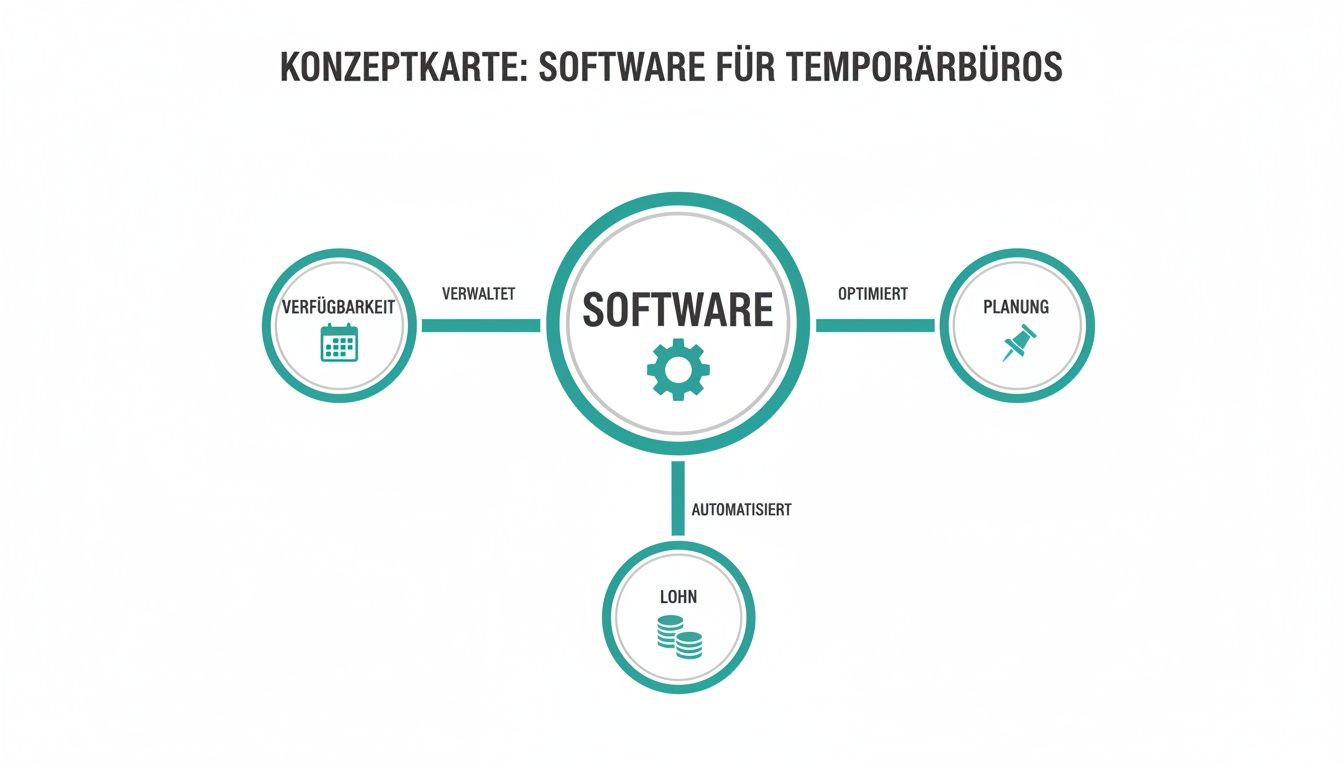
The graphic makes it clear: Only the smooth interaction of these functions ensures a continuous, clean process from the first customer inquiry to the final billing.
Availability query via app instead of telephone marathon
Does this sound familiar? You need ten people for an assignment at short notice and start calling your list. You can't reach everyone, wait for calls back and laboriously enter the answers into some table. This takes hours and is brutally error-prone.
Modern software solves this chaos quite elegantly:
- Request with one click: You create a job advertisement and send it to all qualified employees - with just one click.
- Answers in real time: Your staff receives a push notification on their smartphone and confirms availability directly in the app with yes or no.
- Automatic overview: You can immediately see who is available and can use the confirmations directly for further planning. No follow-up, no waiting.
Imagine an event agency that finds out at 4 p.m. on Friday that it needs 20 additional service staff at short notice for Saturday evening. In the past, panic would have been the order of the day. Today the dispatcher sends a request to his pool. Within 30 minutes he has more than 25 confirmations on his screen and can fill the shift in a relaxed manner.
Intelligent deployment planning with qualification filters
As soon as you know who has time, the actual planning begins. But not everyone who is available fits every position. You wouldn't put a logistician in the kitchen as a cook just because he doesn't have anything to do at the moment.
This is exactly where intelligent planning comes into play. Good software lets you filter your personnel pool according to very specific criteria.
The goal is not to simply find an available person, but to find the most suitable person. With qualification tags such as “Class B driving license”, “experience in catering” or “safety certificate” this becomes child's play.
Think of a hotel that is urgently looking for a bartender with cocktail experience and a service manager for a wedding reception. With the software you filter your pool specifically for these skills and only send the request to the people who really fit. This saves you rejections due to a lack of skills and ensures that your customer gets exactly the quality they expect. Find out more about how sophisticated resource planning software improves your processes.
Mobile time recording for correct billing
The correct recording of working hours is the basis for fair payment and accurate billing with the customer. Unfortunately, handwritten timesheets are often a source of errors, endless discussions and, in the worst case, even fraud.
A mobile time recording via app finally creates clarity and trust:
- Clocking in and out via smartphone: Employees clock in and out directly on site using their app. Simple and accurate to the second.
- GPS validation: Optionally, the software can match the location when stamping. This ensures that the person is actually at the site.
- Digital timesheets: The recorded times automatically flow into a digital report that can be signed by the customer directly on the device.
A security company, for example, sends its people to various objects. There used to be constant debates about whether someone was on time. With GPS-supported time recording, the start of work is completely documented. This creates peace and trust on all sides.
Automated wage preparation with surcharges
The last step in the process is often the most annoying: transferring the recorded hours to payroll. The manual calculation of night, Sunday or public holiday surcharges is not only complicated, but also extremely error-prone.
Integrated software completely relieves you of this work. It automatically calculates the correct wage types based on the stamped times and the stored rules. The final data set can then easily be transferred to your payroll software. This not only saves a huge amount of time, but also prevents expensive and embarrassing wage corrections.
How to master compliance and data protection according to GDPR
Anyone who juggles personnel data is walking a fine line. The General Data Protection Regulation (GDPR) and Swiss labor law set clear rules that quickly become a stumbling block, especially in the dynamic temporary business. Your most important insurance? A specialized software for temporary offices that keeps you legally on track.
The days when employee data was lying unprotected in Excel lists on local hard drives or in private cloud folders are definitely over. This is not only unprofessional, but a huge legal powder keg. A data breach can result in significant fines and – what is often even worse – permanently undermine the trust of customers and employees.
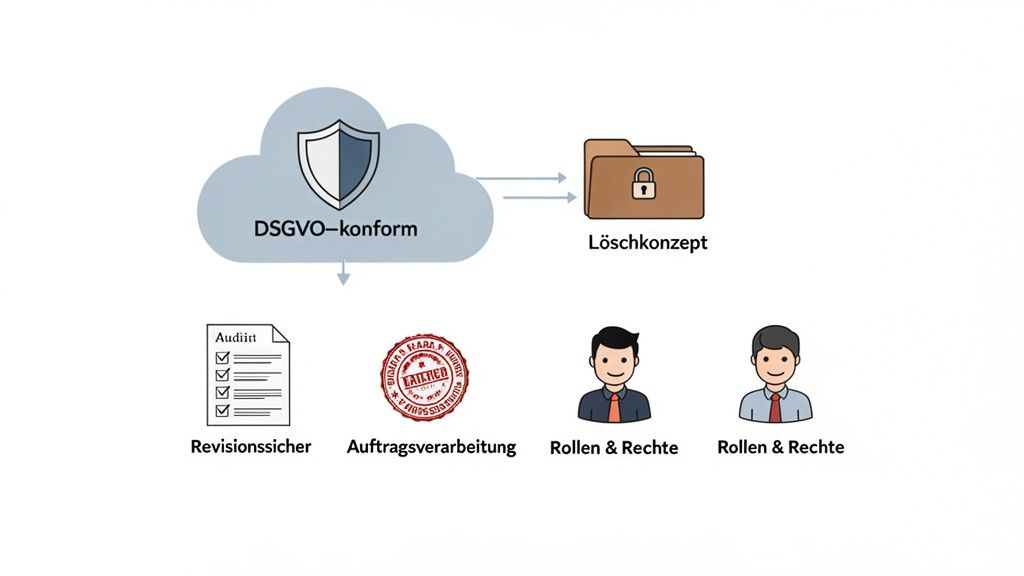
A central, GDPR-compliant platform mitigates this risk from the ground up. It's like a digital vault that ensures all data is in a single, protected location that only authorized people can access.
The foundation for legally secure processes
But a good software solution is more than just a secure storage space. It becomes your active partner in complying with legal requirements. This includes crucial functions that are often lost in manual processes or are prone to errors.
- Secure data storage: All your employees' data is stored encrypted in a certified data center, ideally in Switzerland or EU, to meet the strict GDPR requirements.
- Defined deletion concepts: The software helps you keep an eye on legal retention periods and systematically and verifiably delete data that is no longer needed.
- Audit-proof documentation: Every working time, every change to a deployment plan and all communication are completely logged with a time stamp. This is worth its weight in gold when an audit or legal issues arise.
Think about a healthcare staffing agency. This is not just about names and addresses, but also about highly sensitive information such as medical reports or certificates. Unauthorized access would have catastrophic consequences. Professional software uses a finely adjustable role and rights concept to ensure that a dispatcher only sees the data relevant to his planning and cannot open any confidential documents that are none of his business.
A well thought-out rights concept is not a luxury, but a necessity. It ensures that each employee can only see and edit the information that is absolutely necessary for their task.
This precise control can hardly be guaranteed by hand without errors.
Checklist for your GDPR compliance
Are you unsure whether your current processes meet legal requirements? The following checklist shows typical risks - and how software solves them.
| Test point | Manual procedure (risk) | With software (solution) |
|---|---|---|
| Data storage | Data is distributed across different devices and in insecure clouds. | All data is centrally located and encrypted in a GDPR-compliant environment. |
| Access rights | Every dispatcher has access to all folders and files. | A clear role and rights system restricts access individually. |
| Data deletion | Resigned employees remain on lists indefinitely. | Automatic or semi-automatic processes to comply with deletion deadlines. |
| Traceability | Changes to deployment plans are not traceable. | Every change is logged with a time stamp and user (change log). |
| AV contract | Often an order processing contract with cloud providers is missing. | A standardized AV contract with the software provider regulates the responsibilities. |
In order to obtain comprehensive information about the legal requirements for data protection, a look at general provisions can help. A detailed privacy policy serves as a good practical example here.
If you want to know exactly how we at job.rocks ensure the protection of your data, you will find all the details transparently prepared in our information on data protection. In the end, it's about creating trust and minimizing risks - and that's a task you don't have to do alone.
Integrations for a seamless workflow
A good software for temporary offices rarely works alone. Imagine it like the conductor of an orchestra: it only develops its full potential when it allows all other instruments – i.e. your existing programs – to play together perfectly. Isolated isolated solutions that require you to painstakingly copy data from one system to another are not only painfully slow, but also a guaranteed source of costly errors.
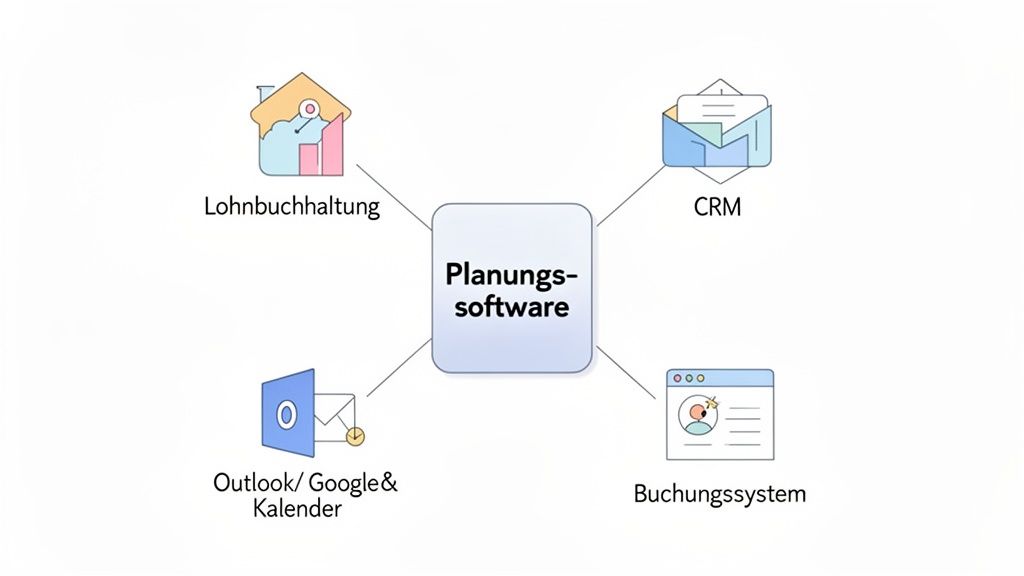
The key to a truly smooth process lies in clever interfaces that connect your tools together. This creates a continuous digital process that relieves you of manual work and ensures data quality.
Seamlessly connect payroll accounting
Probably the most important connection is to the payroll software. Nothing is more frustrating than manually transferring all the laboriously recorded working hours into another system at the end of the month. A typo here, a forgotten allowance there - and the chaos is perfect.
A direct interface is crucial here.
- All digitally recorded and released working times are exported at the push of a button.
- Surcharges for night, weekend or holiday work are automatically calculated and handed over correctly.
- The data set is immediately in the right format for your payroll software (e.g. Abacus, Sage) and can be imported directly.
This not only saves you hours of typing, but also guarantees error-free billing and punctual wages for your employees.
Synchronize customer management and calendar
The connection to your CRM system (Customer Relationship Management) and your team's calendars is just as important. When a customer places a new order, you don't want to have to completely recreate the data again. A CRM integration ensures that customer data and order details are available directly in the planning software.
Calendar integrations with tools like Outlook or Google Calendar.
are at least as crucialImagine if every planned assignment automatically appears in the personal calendar of your employee and the responsible dispatcher. This means everyone always has the current status without having to manually enter a single appointment.
This interaction ensures crystal-clear transparency and prevents double bookings or missed appointments from the outset.
Use specific industry connections
Depending on the industry, additional integrations can make the difference. For example, a catering service provider could connect its planning software directly to a hotel's booking system. As soon as the hotel records an event that requires personnel in the system, a personnel request is automatically generated in the scheduling software. The dispatcher just has to assign the right people.
A look at the current job market shows that such automated processes are becoming increasingly important. While the temporary employment industry serves large volumes, the demand for IT and digital skills is changing significantly: 34% of large Swiss companies are already using AI solutions. For temporary agencies, this means that their software must integrate seamlessly into a wide variety of systems in order to be able to respond quickly to such specialized requests. You can find out more about these developments in the current job index report.
Whether wages, CRM or industry-specific tools – the right connections are the be-all and end-all. So always ask software providers carefully about the available interfaces. A detailed overview of possible integrations and interfaces will help you ask the right questions and ensure that the new solution fits perfectly into your existing IT environment.
Select the right software and successfully implement
Choosing the right software for your temporary office is a far-reaching decision. Not only are you laying the foundation for your future workflows, but you are also choosing a partner who will support the growth of your company. To support you in this important task, I'll show you here what really matters - from selection to smooth introduction.
What really matters when choosing
The market is full of solutions, but very few are really made for the temporary industry. Some are designed for huge corporations, others are so simple that they fail to meet the complex requirements of your everyday life. Your mission is to find the one software that adapts to your processes - and not the other way around.
A sticking point is the user-friendliness, especially that of the employee app. If your temporary powers find the app complicated, they simply won't use it. The result? You end up hanging on the phone again and chasing people.
A good employee app feels intuitive and motivating. It has to make the core functions – reporting availability, applying for jobs and punching times – child’s play. This is the absolute basis for a high level of acceptance and therefore for the success of the entire solution.
Support is just as important. What do you do when everything suddenly comes to a standstill on Friday afternoon? A provider from a different time zone will hardly be able to help you. A local partner based in Switzerland understands not only your language, but also the legal and cultural pitfalls of your market.
Checklist for software selection for temporary offices
This overview will help you separate the wheat from the chaff. Use it to objectively compare different providers and ask the right questions.
| Criteria | What you should pay attention to | Why it is important |
|---|---|---|
| Scalability | Can the software grow with your business? Are there pricing models that adapt to the number of your employees? | You want a solution that will continue to work even if you double your staff pool without costs exploding. |
| Employee App | Is the app available for iOS and Android? Is it easy to use and does it offer all the necessary functions (availability, time clock)? | High user acceptance among your staff is the key. If the app is bad, the whole project fails. |
| Industry specialization | Does the provider understand the special features of temporary work (e.g. complex surcharge calculations, framework agreements)? | Generic planning tools often fail because of the details. Specialized software covers your core processes right from the start. |
| Support model | Does the provider offer support in your language and during your business hours? Is there a personal contact person? | If there is a fire, you need quick and competent help. Good support is worth its weight in gold and secures your operation. |
| Data protection (GDPR) | Where is the data hosted (ideally: Switzerland/EU)? Does the provider offer an order processing agreement (AVV)? | Complying with data protection laws is not an option, but a requirement. A local provider often offers more security here. |
With these criteria you have a solid basis for making an informed decision that will really advance your business.
The introduction in five steps
The best software is of no use if the introduction sinks into chaos. A clearly structured process is the key to success. Imagine a medium-sized promotion agency that takes the leap from countless Excel spreadsheets to a professional solution. This is what your path could look like:
- Analysis & Planning: First, the agency takes a close look at its existing processes. Where do we waste most of our time? Which processes are prone to errors? From this she derives clear goals, for example: “The staffing time for short-term requests should be reduced by 50 %.”
- Data import: All employee and customer data must be imported from the old Excel lists into the new software. A good provider will not leave you alone and will actively support you.
- Configuration: Now the software is adapted to the DNA of the agency. This applies to wage types, specific surcharge rules and individual qualification filters in order to always find the right staff.
- Team training: The dispatchers receive targeted training for the new system. At the same time, external employees are introduced to the new app with short videos and simple instructions so that the start goes smoothly.
- Start & Accompaniment: The software goes live! In the first few weeks, the provider is close to the team as a sparring partner. A typical hurdle: Some long-time employees are skeptical about the app. The agency reacts cleverly with an internal “question time”, shows the advantages live and dispels concerns. This is how acceptance is conquered step by step.
How to increase your profitability with the right software
At the end of the day, the investment in a software for temporary offices has to pay off big. It's not about just making processes nicer, it's about directly increasing your profits. Let's break down return on investment (ROI) into tangible factors and see how a modern platform really makes your business more profitable.
The biggest adjustment screw is clearly the time of your dispatchers. Every call, email and manual data entry is a hidden cost. Good software relieves your team of these time-consuming routine tasks and gives them the freedom to concentrate on what really makes money: serving your customers and expanding your business relationships.
Quicker filling of positions
Imagine an agency with a pool of 200 temporary forces. Without software, filling an urgent request often takes several hours - a nerve-wracking back and forth. With an automated system that queries availability via app and suggests suitable profiles, this effort is reduced to just a few minutes.
Faster job filling means more sales. Every single day that a position remains unfilled is lost contribution margin. Point. By accelerating this process, you maximize the utilization of your employees and thus your profits.
Especially in a volatile market, speed is everything. The Swiss temporary market is subject to strong economic cycles. The Swiss Staffing Index, for example, shows that working hours in the first quarter fell by around 8.4% compared to the previous year. Such a decline can put a lot of pressure on liquidity. Software that radically shortens staffing times is your buffer for remaining profitable even in such phases. You can find out more about the current developments in the temporary market here at pressmailing.net.
Less errors, less costs
Manual processes are an invitation for errors. An incorrectly transferred number of hours here, a forgotten allowance there – the complex correction loop in payroll begins. Each of these errors not only costs time, but also money and, above all, nerves.
An integrated software solution systematically eliminates these sources of error:
- Digital time recording: Hours are recorded precisely via the app and no longer have to be laboriously typed out. The risk of transposed numbers drops to zero.
- Automatic wage preparation: Surcharges and expenses are calculated system-based and in accordance with the rules, which excludes manual calculation errors.
- Avoiding incorrect bookings: Using clever qualification filters you can ensure that the right person is always booked for the job. This prevents expensive rebookings and dissatisfied customers.
Retaining satisfied employees
The fluctuation of your temporary employees is an enormous cost factor. Constantly searching, onboarding, and managing new profiles ties up significant resources that could be better invested. A truly user-friendly employee app and transparent communication are key here.
If your employees feel well looked after and valued, they will stay with you longer. They appreciate the easy planning, the punctual and, above all, correct payment and the uncomplicated communication via an app. Lower fluctuation directly means lower recruitment costs - and therefore a tangible, higher profit for your temporary office.
The most frequently asked questions from practice
Here I have compiled the answers to the questions that I encounter most frequently in practice. They are intended to help you get a clear feeling for what to expect and how to make the change successfully and without headaches.
How quickly is the software really ready for use?
Many agencies hesitate because they fear a complicated conversion process that will take months. The reality is often different: the duration depends almost exclusively on the quality of your data.
Are your employee and customer data neatly recorded in an Excel list? Perfect. Then the import and basic setup are often completed within one to two working days. The key is preparation - a well-maintained master data list is half the battle.
How does data import work exactly?
Importing your existing data is the crucial first step. This usually works very pragmatically: Your software provider gives you a template, usually an Excel file with clearly defined columns for names, qualifications, contact details and so on.
Simply transfer your previous information into this template. The provider then loads this file into the new system for you. This process ensures that all your valuable data is correctly available from day one and you can continue working seamlessly.
Do I have to train my team for weeks?
It's clear: no. Good software should be so intuitive that the training effort remains minimal. A short introduction to one to two hours is often enough for your dispatchers to confidently master the core functions such as operational planning and communication. Here your team will learn how to create requests, assign staff and stay on top of things at all times.
Getting started is even easier for your external employees. Short explanatory videos or simple, illustrated instructions that show you how the employee app works are usually sufficient.
The goal of a modern solution is not to overwhelm you with complex functions. It's designed to do the work for you by adapting to your processes and being easy to use. An intuitive user interface is therefore one of the most important selection criteria.
In the end, it's about getting up and running quickly and benefiting from the advantages immediately. The one-off effort for the introduction is almost always significantly less than the daily, manual effort that you would have to do without a specialized solution.
Are you ready to say goodbye to confusing Excel lists and constant email chaos? Discover how job.rocks simplifies your deployment planning and management from the ground up. Request your personal demo now and experience for yourself how uncomplicated and efficient the coordination of your temporary staff can be. Learn more at job.rocks.